
New Look, New Language: Check Out Our Latest Updates!
We’ve been hard at work making your experience faster, cleaner, and more globally friendly. This month’s release brings some major improvements, from new language support to key productivity upgrades.
Streamline Your Workflow with the New “Office” Filter
For our users who manage quotes across multiple locations, we’ve introduced a highly requested productivity boost. You’ll now find an “Office” filter on the Quote List page.
Say goodbye to manual searching! This new filter lets you instantly isolate and view quotes specific to any of your offices, making it faster than ever to manage, track, and follow up on business from a single location. Take advantage of this and create as a default a saved filter for quick access every time!
You can find this under the quotes tab, and click on the filter located near the top right of the page.

A Cleaner, Clearer Look for Product Descriptions
We’re constantly striving to simplify your viewing experience, and that includes eliminating unnecessary clutter.
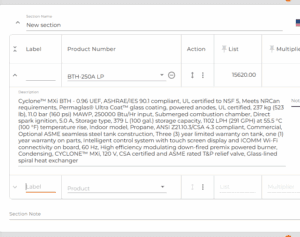
We know how important it is to see the full context of a product, so we’ve made a clean design change: the Product Description box will now fully expand, and we have removed the scroll bar. This means no more scrolling within a small box—you can see the complete product description immediately, making reviews and data entry much smoother.
Bienvenue! Autoquote is Now Fluent in French!
We’re thrilled to announce a major step forward in making Autoquote accessible to more people around the globe: out tool is now in French!
If French is your preferred language, you can now navigate through AutoQuote, from settings to features, in a way that feels completely native and intuitive. We are committed to supporting a truly international user base, and this release makes it easier for our French-speaking users to get the most value out of every feature.
- How to switch: Just head to the top right corner of the page, next to your AI notification, app and select Français.
- Please note that you should not switch languages midway through a quote, or you would end up with a quote with 2 different languages.